
Use this guide when your team spends time explaining return policies, exchange rules, eligibility, and next steps after a purchase.
Return & Exchange Helper is a reactive support playbook. It explains verified policies, requirements, and next steps; it can request configured customer properties and a handoff. Explaining eligibility criteria does not confirm that an individual request is approved.
It is not a generic FAQ agent and it should not approve exceptions by itself. It works best when your policies are clear, the customer supplies the necessary context, and your team has defined when the playbook can continue and when it must hand off.
What Return & Exchange Helper does
Return & Exchange Helper helps customers move through a return or exchange request.
It can:
- Handle questions about policies, conditions, and preparation for returns, exchanges, and related refunds. A request to perform the operation needs another responsible party.
- Explain return and exchange policies from approved knowledge.
- Use details already supplied and ask one concise clarifying question when a missing detail blocks progress. Configured properties use the collection workflow; there is no universal list of required details or photos.
- Use purchase context already supplied in the conversation, without looking up or claiming live order, payment, return, refund, or inventory status.
- Explain documented time windows, packaging requirements, destinations, and shipping instructions. A policy timeline is not a guaranteed approval, pickup, or payment date.
- Hand off when the request needs approval, an exception, a refund decision, or human investigation.
- Work alongside Instant Answers, Order-Update Delight, Webchat, Inbox assignment, and response rules.
The playbook must use business directives, approved knowledge, and verified context. It can share a verified policy link or one bounded question with one to three grounded choices when the tool and route support them. Choosing an option or opening a link does not create or complete a return.
Playbook selection depends on conversation intent and context, an enabled flow, and its access conditions. An isolated phrase does not guarantee activation or an immediate reply.
When to use it
Use Return & Exchange Helper when:
- Customers often ask how to return or exchange products.
- Your policy has repeatable rules: time window, item condition, eligible products, required proof, refund method, exchange options, and shipping instructions.
- Your team wants AI to handle the first support step before a person reviews exceptions.
- Customers need a guided path instead of a general FAQ answer.
- You want returns and exchanges to land in the Inbox with the right ownership when a person is needed.
It is useful for guidance based on documented criteria, collection of permitted properties, and routing requests that need review. It does not guarantee eligibility, stock, human availability, or response time.
When not to use it
Do not use Return & Exchange Helper as the owner for every post-purchase case.
Use Order-Update Delight when the customer mainly asks where an order is, whether it shipped, or how to track a package.
Use Order Cancellation Assistant when the customer wants to cancel an order before it ships or before it is too late to cancel.
Use Instant Answers when the customer only needs a general policy explanation and does not need a guided return or exchange flow.
Use Smart Recommender when the customer wants help choosing another product before buying.
Use a Custom Agent when you need your own instructions or intents for a bounded flow. Before relying on an external action, confirm the specific tool, integration, and access: writing a URL or instruction does not create that capability or authorize operations.
Use the Inbox directly when the case involves fraud concerns, legal language, high-value exceptions, payment disputes, or a customer who is very upset.
What it needs before launch
Before enabling Return & Exchange Helper, confirm this type is available with your business plan, features, role, and active quota. Then check:
- The return and exchange policy is current and approved.
- The policy explains windows, item condition, non-returnable products, proof required, refund method, exchange options, and shipping responsibility.
- Purchase context supplied by the customer is enough to guide the process; a live order lookup needs another authorized tool or responsible party.
- Your team knows which cases the playbook may handle and which cases require a person.
- The incoming channels where customers ask for returns or exchanges are connected and ready.
- A teammate or team is configured for handoff.
- Response rules, business hours, and team capacity reflect the service you can actually offer; they do not create a playbook SLA.
For setup validation, use Verify your data and signals after setup.
What you can configure
Open Playbooks, click Explore playbooks, and choose Return & Exchange Helper.
The available cards can vary, but you may be able to review:
- Knowledge or upload documents: return policy, exchange policy, warranty rules, shipping instructions, product exclusions, and internal support guidance.
- Incoming channels: where customers can ask for return or exchange help.
- Tone: the voice used in replies.
- Escalation or assignment: who should take over when a person is needed.
- Prompt or instructions, when available: what the playbook may explain, what it must not approve, and when to hand off.
- Prerequisite properties, when applicable: a valid list of customer details the enabled Property Collector may request. This playbook’s initial configuration does not include a Web search card; adding a URL does not enable external website queries.
- Follow-up: the number of nudges, the wait, and the final action if the customer stops replying.
Opening a new playbook prepares a draft. Save can create or update configuration and its workflow; enabling is a separate action with persistent effects. Local card changes and returning to the cards do not prove final configuration was saved. Disabling does not guarantee cancellation of all queued work.
Incoming channels controls where requests are admitted. Automatic selection covers incoming channels; manual selection limits them. Neither connects a channel, identifies the customer, grants consent, or guarantees the outgoing channel and delivery. The figure shows this shared control in an independent Collector draft, without saving.

Tone combines one to three traits as style guidance; it does not change policies, tools, permissions, or playbook boundaries and does not guarantee a particular reply. The independent figure shows Friendly, Playful, and Exclusive selected without saving.

Prepare policy knowledge
The playbook needs policy content that is specific enough to guide the customer.
Include:
- Return and exchange windows.
- Eligible and non-returnable product categories.
- Required product condition, packaging, tags, receipt, order number, or photos.
- Whether exchanges can be made for size, color, product, store credit, or refund.
- Who pays for return shipping.
- Pickup, drop-off, mail-in, or store-return instructions.
- Refund method and expected timing.
- Warranty or defective-product rules.
- What happens when an item was final sale, discounted, personalized, opened, damaged, or used.
Avoid vague policy content such as “contact us for returns” if you want the playbook to answer consistently. If the policy changes, update the source and check that it is available for retrieval before expecting the playbook to use the new rule. A selected or saved file does not prove that the provider prepared the document and its index.
The Upload documents figure uses the shared component in an independent Custom draft: no file is selected, uploaded, or ready for retrieval; it does not show an approved policy.

When Prompt is available, give clear instructions about sources, boundaries, and handoff criteria. They cannot enable a missing tool, authorize a refund, expand data access, or replace consent. The figure is an empty Prompt with a placeholder in another Custom draft, without saved instructions or an executed reply.

Configured required properties are pursued at a natural opening after useful guidance, normally one at a time, even if the current answer can continue without them. Optional items may be declined. The Collector must be enabled and respect the valid list, scope, and prerequisites; resolving a bounded request does not always mean obtaining a value. Do not infer missing details or press after a refusal.
A relative date only helps interpret a window when the customer introduced that context and the policy and relevant facts are grounded. Clarify ambiguous dates; do not infer urgency, eligibility, hours, stock, or human availability from today’s date.
Define what needs a person
Returns and exchanges often need human judgment.
Configure handoff or team ownership for cases such as:
- The customer asks for a refund approval.
- The request is outside the normal return or exchange window.
- The item is damaged, defective, wrong, missing, used, personalized, or final sale.
- The customer disputes payment, shipping cost, or refund amount.
- Purchase context cannot be confirmed and a decision requires verifying the order.
- The customer asks for an exception.
- The customer explicitly asks for a person. Frustration alone does not order an automatic handoff.
- The request requires a shipping label, pickup, replacement, store credit, or operational action that the playbook cannot safely complete.
These cases may need human validation, but they do not all imply an automatic handoff. The playbook can explain a documented policy before applying the appropriate protocol.
An explicit request to perform an unavailable operation, look up live status, or do work outside scope requires a redirect; a greeting, ambiguous request, or single failed search does not. If available sources and tools cannot resolve a policy question, the playbook must acknowledge the limit and apply its handoff protocol without guessing.
The figure shows Atención demo as a destination team in an independent Collector draft, without saving. It is not a playbook, an assigned conversation, or a human reply. The redirect request, available alternative flow, chosen team or owner, membership, capacity, hours, and protocol are separate steps. Do not promise a universal permanent AI pause or immediate attention.

For handoff behavior, use AI handoff to Inbox.
Connect it to Webchat and Inbox
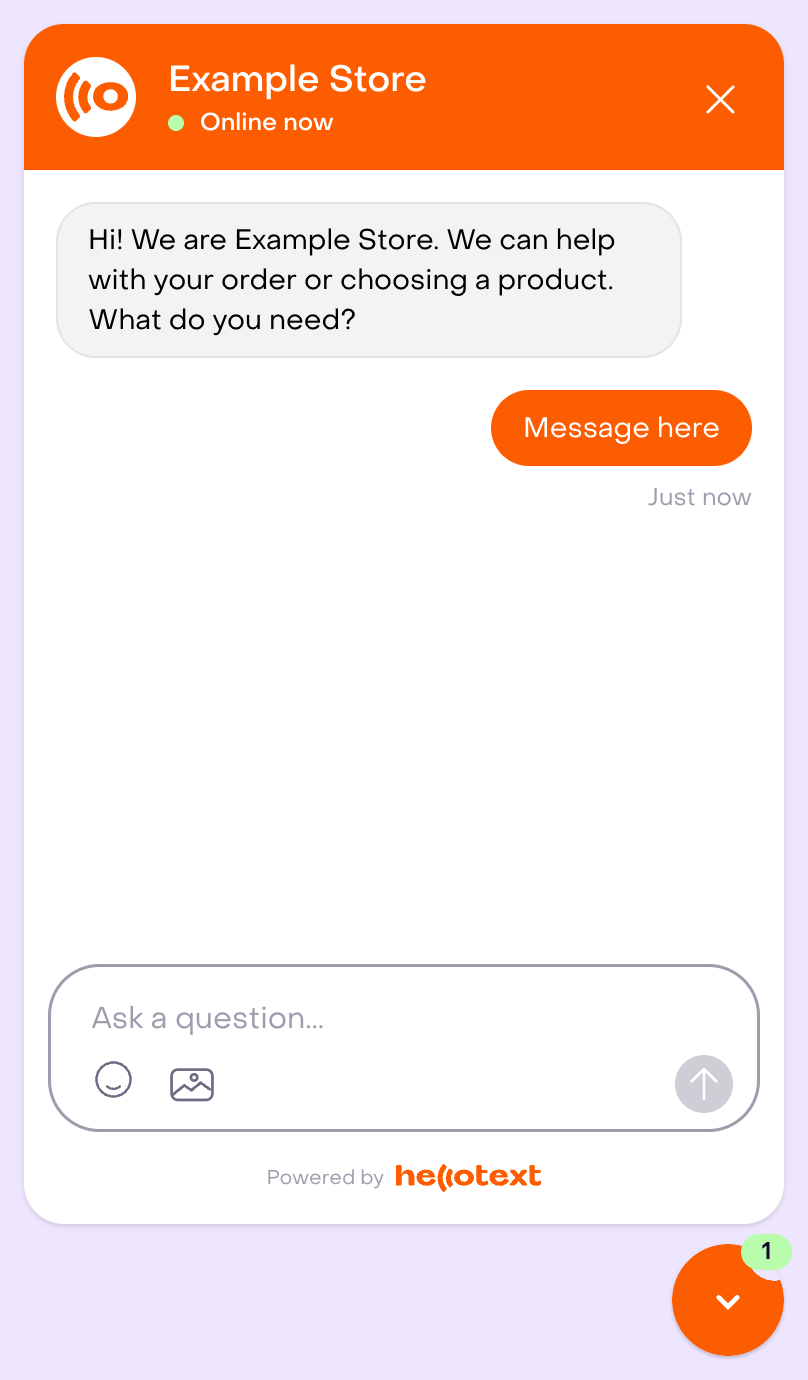
Return & Exchange Helper can work well with Webchat Widget when customers look for post-purchase help from your site.
The full preview is an independent Webchat editor example with an unsaved greeting, demonstration customer bubble, composer, and launcher. Online now does not prove human presence; this is not a real conversation, installation, execution of this playbook, or approval of a request. The widget’s invitation to choose products does not expand the Helper’s scope.
Before launch, confirm:
- Webchat or the incoming channel is enabled.
- The opening message does not promise an instant approval.
- The handoff owner is the right teammate or team.
- Response rules and the calendar express operational attention targets without guaranteeing when a person will reply.
- The Inbox team knows which permitted context to review and which approvals remain pending.
The figure shows an existing Inbox policy with five-minute targets, without changes. It is not a returns or exchanges SLA or an actual reply; closing or snoozing a conversation is not a response.

How to test it
Test with realistic post-purchase messages before enabling the playbook broadly.
Review written cases and configuration without sending first. If Playground is available, it may save simulations, messages, events, and draft overrides and call the provider; it does not prove real identity, consent, eligibility, or delivery. A real test needs an authorized environment, prepared recipients and channels, and may send messages or start work.
Prepare these cases:
- A straightforward return request inside the policy window.
- A straightforward exchange request for size or color.
- A request with missing order number or item details.
- A request with purchase context already supplied, distinguishing it from a live lookup that this playbook does not perform.
- A request outside the return window.
- A final-sale, personalized, opened, used, or non-returnable item.
- A damaged, defective, wrong, or missing product.
- A refund approval request.
- A complaint from an upset customer.
- A question that is only a general policy FAQ and may belong to Instant Answers.
- A tracking question that should go to Order-Update Delight.
Review whether the playbook uses existing context, follows the correct source, requests only permitted properties, and separates guidance from approval. Check a verified URL, a bounded question with choices, and its fallback when the format is unavailable; do not infer delivery from an internal tool result. Verify destination and human response separately. Reconcile an uncertain mutation before repeating it.
What to review after launch
During the first days, review:
- Which customer messages activated the playbook.
- Whether the playbook followed the right policy source.
- Whether it collected useful information before handoff.
- Which cases were resolved without a person.
- Which cases required approval, exception handling, or investigation.
- Whether handoffs went to the right teammate or team.
- Repeated unclear cases that suggest missing policy content.
- Metrics actually available, with their period, population, and denominator. No dedicated report is confirmed for this type; do not assume exclusive playbook rates. Resolving a conversation, delivering a message, recording satisfaction, and completing a refund are separate outcomes.
Tune one thing at a time: policy knowledge, channel selection, tone, handoff target, or the cases the playbook should own.
Related guides
- Playbook library by mission
- How to enable a playbook
- How to customize a playbook safely
- Instant Answers playbook
- Order-Update Delight playbook
- Order Cancellation Assistant playbook
- Smart Recommender playbook
- Custom Agent playbook
- Webchat Widget playbook
- AI handoff to Inbox
- Inbox and conversations overview
- Response times and response rules
- Playbook reporting