
Use this guide when your team spends time answering the same support questions again and again.
Instant Answers is a reactive AI support playbook. It responds when a customer asks a common support question and uses approved knowledge, policies, and connected context to answer or hand off when a person should take over.
It is not a journey route, a campaign, a product recommender, or a custom agent with your own intents. It is the support playbook for repeat questions that should be answered quickly and consistently.
What Instant Answers does
Instant Answers helps answer common questions using documented information. The playbook name does not guarantee an immediate response, human support outside business hours, or a service level.
It can:
- Respond to questions within scope when the playbook is enabled and the conversation is admitted through contextual intent selection and its rules. An isolated phrase does not guarantee this playbook takes the conversation.
- Use approved instructions and knowledge that are available to this playbook and prepared for retrieval.
- Answer questions about shipping policies, payment methods, store information, product care, warranty basics, sizing guidance, and other repeat support topics.
- Ask a clarifying question when the customer’s request is missing important details.
- Acknowledge that it cannot confirm an answer, or request another playbook or human support when appropriate.
- Work alongside Webchat, Inbox assignment, response rules, and other support playbooks.
Instant Answers works best when the answer is already written somewhere your team trusts. It can explain static product facts such as materials or care; it does not provide live stock, prices or availability, track a specific order, or carry out a return. Connected context and a document do not expand that scope.
When to use it
Use Instant Answers when:
- Your team answers the same FAQs repeatedly.
- Customers ask questions before or after purchase that do not require a custom decision.
- You have current policies, help pages, PDFs, product notes, or internal support guidance that the agent can use.
- You want to reduce repetitive work without promising response times or continuous AI or human availability.
- You want the agent to answer simple questions and hand off exceptions to the right teammate or team.
Good topics include shipping policy, return-window explanations, payment methods, store hours, product-care instructions, warranty basics, size-guide explanations, and where to find account or order information.
When not to use it
Do not use Instant Answers as the owner for every conversation.
Use Order-Update Delight when the question is about a specific order, shipment, tracking number, delivery state, or “Where is my order?”
Use Smart Recommender when the customer wants product discovery, comparison, or recommendations.
Use Return & Exchange Helper when your account has that playbook available and the customer needs a returns or exchanges flow, not only a policy explanation.
Use Order Cancellation Assistant when your account has that playbook available and the customer needs help requesting a cancellation, not only a policy explanation.
Use a Custom Agent when you need custom intents, instructions for a narrow specialist, or a support mission that is too specific for the prebuilt playbook.
Use a journey route when the experience must follow visible steps, waits, questions, branches, and assignments.
What it needs before launch
Confirm that your account can configure this playbook type: availability, cards and quota depend on features, plan and role. Access to another playbook type does not guarantee access to this one.
Before enabling Instant Answers, confirm:
- The support topics it should answer are clear.
- The policies, FAQs, documents, or approved websites it should use are current.
- Conflicting or outdated support content has been removed.
- The intended incoming channels are connected and enabled. Check the destination, permission and outgoing channel separately; receiving a question does not guarantee a reply can be sent.
- A valid handoff target is configured, with people who have access, team membership and capacity to handle it.
- Your team knows which questions the playbook should answer and which ones it should leave to a person.
- Response rules and business hours match the level of service you want for support conversations.
Instructions do not create tools, integrations or permission to save data, make HTTP requests or perform external operations. If you need an action, check the specific available tool and its scope before designing the flow.
For setup validation, use Verify your data and signals after setup.
What you can configure
Open Playbooks, click Explore playbooks, and choose Instant Answers.
Opening a new form prepares a draft; review what Save will retain before using it. Going back from a card may keep local edits. Final saving and enabling are separate steps that can persist configuration and change the flow.
The available cards can vary, but you may be able to review:
- Knowledge or upload documents: FAQs, policies, product notes, guides, or other approved support content.
- Incoming channels: where eligible questions can arrive; they do not by themselves choose the outgoing channel.
- Tone: one to three tones to guide the voice, without guaranteeing an exact reply.
- Escalation or assignment: who should take over when the playbook cannot resolve the request.
- Available sources and tools: check which ones this playbook supports. Do not assume a Web search card is present because you saw one in Custom Agent. Writing a URL in instructions does not add or query a site. When another configuration supports domain search, it does not guarantee the path, port, exact page or freshness of the information.
- Follow-up: the number of nudges, the wait, and the final action if the customer stops replying.
Independent fictitious example: this shared Incoming channels control comes from a Property Collector draft. It shows All incoming channels and the manual alternative, without saving. It does not represent a configured Instant Answers playbook, a connection or a sent reply.

Independent fictitious example: the shared Tone control has Friendly, Playful and Exclusive selected without saving. These guide style; they do not show how AI responded.

Keep the setup focused. If the playbook needs too many exceptions, split the work: use a specialized support playbook, a custom agent, or an Inbox process for the risky cases.
Prepare knowledge
Knowledge quality is the biggest factor in answer quality.
Use sources your team already trusts:
- Help center pages.
- Shipping, returns, exchange, warranty, and privacy policies.
- Store hours, pickup instructions, and contact information.
- Product-care notes, size guides, and material guidance.
- Internal support instructions that are stable enough for customers.
Before uploading or approving sources, remove:
- Expired promotions or old prices.
- Draft policy language.
- Contradictory return or warranty rules.
- Internal notes that should not be shared with customers.
- Unsupported claims about delivery times, refunds, or approvals.
Selecting a file, saving it and having it prepared for retrieval by the provider are different states. Check readiness of the sources the playbook can actually use; do not assume a visible file is already available for answering. If a source changes, review versions, conflicts and readiness before expecting an updated answer.
Independent fictitious example: the shared Upload documents area comes from a Custom Agent draft. It is empty: no file was selected or uploaded. It helps identify the control, without demonstrating ready knowledge or an Instant Answers reply.

If you configure customer properties, review this playbook’s valid list and the enabled Property Collector. Required items are pursued at a natural point in the conversation, without turning the opening into a questionnaire; optional items may be declined. An item can be resolved without being collected because of its limits. Priority does not establish consent or grant permission for other data or actions.
Define handoff boundaries
Instant Answers should hand off when a customer needs a person, not a general answer.
Common handoff cases include:
- The customer asks for a person.
- The customer needs work outside scope. Frustration alone, a greeting or one failed search are not automatic handoff reasons.
- The customer asks to address a defective, damaged, wrong or missing product. A general policy explanation may still be within scope.
- The request requires processing an approval, exception, refund, cancellation, exchange, account change, access to private payment details, or human sales action.
- Available sources cannot support an answer and a useful clarification cannot resolve the missing information. Review conflicts and retrieval options before concluding that no answer is available.
- The customer asks about a specific order and Order-Update Delight should handle it instead.
- No active playbook can resolve the request safely.
A redirect request may switch playbooks or lead to human support depending on active playbooks, admission and configuration. It does not by itself confirm an owner, a reply or a universal permanent AI pause. Target, team, capacity, hours and assignment protocol determine how support continues. Disabling a playbook also does not demonstrate that all queued work was canceled.
Independent fictitious example: shared Escalation in a Property Collector draft shows Atención demo, a destination team. It is not a playbook or evidence of an assigned conversation, an available person or a reply. It was not saved or enabled.

For handoff behavior, use AI handoff to Inbox.
Connect it to Webchat and Inbox
Instant Answers can work well with Webchat Widget.
Webchat gives visitors a place to ask from the site. Instant Answers can answer supported questions after the conversation starts. The Inbox gives your team a place to handle exceptions, handoffs, and follow-up replies.
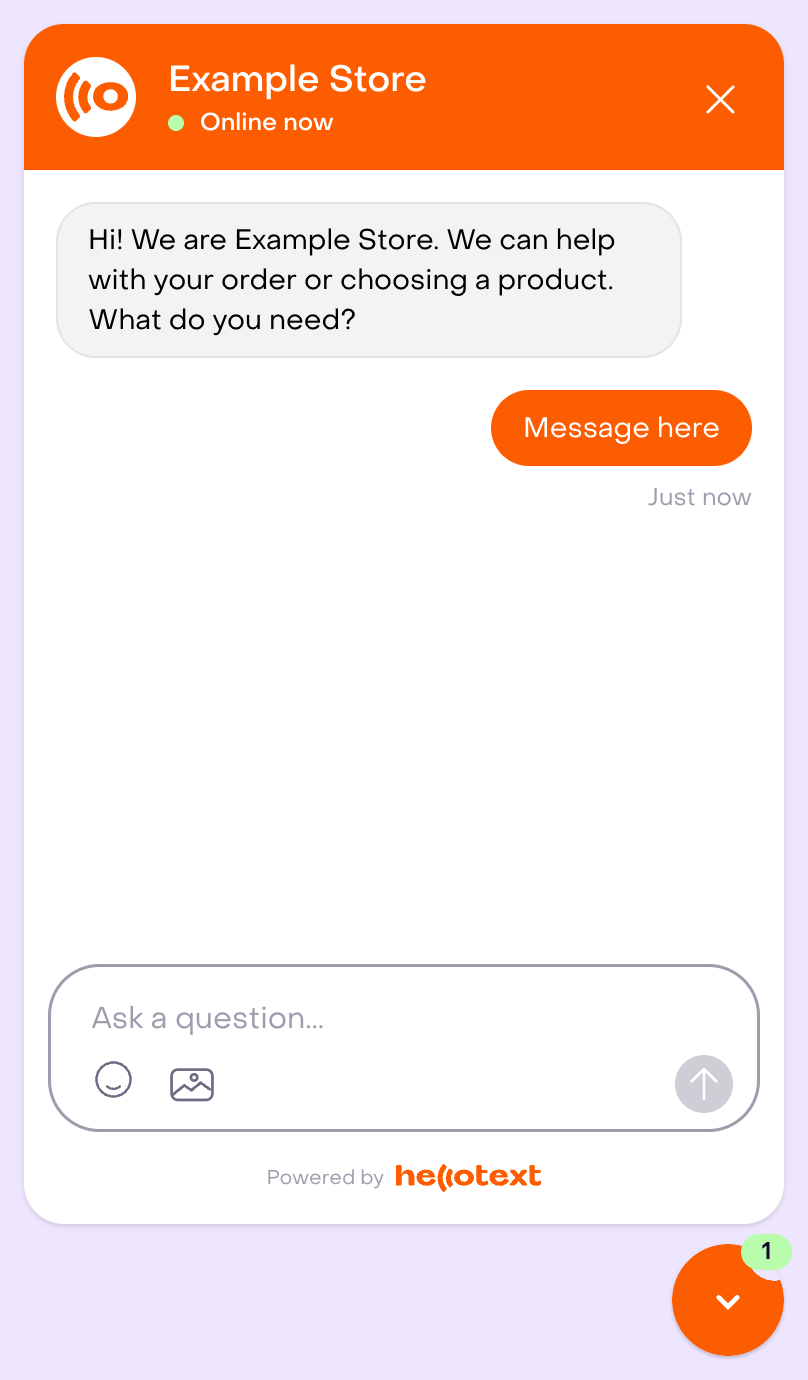
Independent fictitious example: this full Webchat editor preview shows an unsaved greeting, a demonstration customer bubble and the composer. The Online now label belongs to the preview: it does not prove human availability, a real conversation, installation or Instant Answers execution. The widget’s invitation to choose products does not expand this playbook’s scope.
Before launch, confirm:
- Webchat or the incoming channel is enabled.
- The opening message does not promise support the playbook cannot provide.
- The handoff owner is the right teammate or team.
- Response rules reflect how quickly a person should reply after a handoff.
Independent fictitious example: this existing Inbox policy has five-minute targets for first and ongoing replies. It was not changed. Targets and the calendar help track support; they do not guarantee AI latency or a human reply. Human handoff requires a human reply to satisfy its wait; closing or snoozing is not a response.

How to test it
First write realistic cases and their expected outcome: answer with a specific source, clarify, acknowledge a boundary or hand off. Include:
- A common FAQ with a clear answer in the approved knowledge.
- The same question written with typos, short wording, or casual language.
- A question that needs a clarifying follow-up.
- A question that is not covered by the uploaded documents or approved pages.
- A question where two documents could conflict.
- A specific order-status question that should go to Order-Update Delight or hand off.
- A product recommendation question that should go to Smart Recommender or hand off.
- A request to carry out a return, exchange, refund, cancellation or complaint resolution that should hand off or route elsewhere; compare it with a general policy question.
- A message from each incoming channel you plan to use.
If your account offers Playground, check its scope before running it: it can save simulated conversations, messages and events and call the AI provider. A simulation does not prove identity, consent, eligibility, outgoing permission or delivery in a real channel.
For an authorized real test, first confirm test profiles, destinations, permissions, channels and intended effects. Do not repeat a send or action with an uncertain outcome before reconciling what happened. Review whether the answer is grounded, concise, correct for the channel, and clear about next steps.
What to review after launch
During the first days, review:
- Which customer messages activated the playbook.
- Which questions were answered successfully.
- Which questions should have gone to another playbook.
- Whether answers cited or followed the right source.
- Whether customers asked follow-up questions because the answer was unclear.
- Whether handoffs went to the right teammate or team.
- Repeated unanswered questions that suggest missing knowledge.
- Response speed, resolution rate, handoff rate, customer replies, failed messages, and opt-outs when relevant.
Use the views and metrics available for this playbook type. Do not assume a dedicated Instant Answers report or all those indicators. Preserve population, period and denominator when comparing; a resolved or redirected conversation does not prove delivery or sale attribution.
Tune one thing at a time: knowledge, channel selection, tone, handoff target, or the support topics you expect the playbook to own.
If you want to measure satisfaction after resolved support conversations, use CSAT Pulse alongside the support playbook.
Related guides
- Playbook library by mission
- How to enable a playbook
- How to customize a playbook safely
- AI handoff to Inbox
- CSAT Pulse playbook
- Webchat Widget playbook
- Order-Update Delight playbook
- Return & Exchange Helper playbook
- Order Cancellation Assistant playbook
- Smart Recommender playbook
- Custom Agent playbook
- Inbox and conversations overview
- Response times and response rules
- Playbook reporting