
Use this guide when a playbook is already configured and you want to adapt it without accidentally changing how it decides, replies, or sends messages.
Not every playbook is customized the same way. Some playbooks are autonomous AI agents, some are active sales playbooks that send or recommend based on signals, some are reactive support playbooks that respond when a customer writes in, and some are journey routes with defined steps. Before changing anything, identify which type of playbook you are editing and which configuration cards are available.
If you have not launched the playbook yet, start with How to enable a playbook.
If the playbook is active but did not send, first check How Hellotext decides whether a playbook can send. The safest edit depends on whether the issue is trigger, eligibility, channel readiness, timing, handoff, or content.
If you need a checklist for one example, use Troubleshoot a playbook that did not trigger or send before editing.
Before you edit
Open Playbooks, choose the playbook, and review its configuration cards. Controls depend on the type, plan features, and your access. A card may show a plan upgrade; seeing it does not guarantee that you can save it. Also confirm the correct business and playbook.
Ask based on the playbook type:
- For an active sales playbook: which signal, audience, or moment allows Hellotext to act?
- For a reactive support playbook: what kind of question should it answer, and when should it hand off?
- For a custom agent: which intents should activate this agent, and what should stay out of scope?
- For a route: which trigger, steps, waits, conditions, branches, and assignments make up the flow?
- For any playbook: which report, Inbox conversation, or Playground test will show whether the change worked?
Before changing a control, keep the previous configuration and define one specific change. In the component editor, Go back returns to the cards; it does not confirm the final playbook save. Check the final save action and its result. Other controls, such as enabling the playbook, may persist immediately. If the result is uncertain, read the saved state again before repeating.
Not every playbook has a visible stop rule. In a route, there may be exit conditions or steps that end the flow. In a support agent, the conversation may end naturally if the customer stops replying, or it may hand off based on rules. In active sales playbooks, many eligibility, frequency, or completion rules are internal or controlled by the playbook logic.
When to disable
Decide based on the change’s effect on real customers and when it is saved. Tone, documents, web search sites, and the handoff team can also change the next reply or its destination; their category does not automatically make them safe.
For a small clarification, keep the previous version, change one part, and review the result before continuing. Consider disabling temporarily when you change:
- The prompt’s purpose or boundaries.
- Intents used to select an agent.
- Properties it must collect.
- Incoming or outgoing channels.
- Discount strategy or offer rules.
- Route steps, conditions, branches, or assignments.
Disabling affects admission of new activity according to the playbook type. It does not guarantee cancellation of every existing conversation, proposal, message, or queued job. Check their current state before expecting an immediate stop. Enabling again does not confirm eligibility or delivery either: first check the saved change and that flow’s dependencies.
What you can customize
Use this table as a quick map:
| If the playbook has… | Usually applies to… | What it changes |
|---|---|---|
| Agent prompt | AI agents, custom agents, and some autonomous playbooks | Mission, tone, boundaries, and when to hand off. |
| Tone | Playbooks with AI-generated replies or messages | The voice and style the playbook uses to communicate. |
| Intents | Custom agents and custom playbooks | Which customer messages activate that agent. |
| Knowledge | Sales or support AI agents | What information the agent uses to answer. |
| Properties | Playbooks that include the Property Collector subcomponent | Which missing profile data the playbook should ask for before continuing. |
| Incoming/outgoing channels | Playbooks that allow channel selection | Where the playbook can reply or send. |
| Discounts | Sales playbooks that allow offers | The strategy, AI incentive limits, and imported promotions the agent may use. |
| Escalation | AI agents, support, Webchat, and some custom playbooks | Who takes over when the agent should not continue. |
| Follow-up | Playbooks that show this card | How many nudges the agent may send, how long it waits, and what it does if the customer still does not reply. |
| Route steps | Journeys or routes | Sequence, waits, branches, assignments, and exit from the flow. |
If a card is missing, check the playbook type, access, and available features. That part may not apply, may be controlled internally, or may be unavailable to your account. A prompt does not replace a missing control or enable a tool, permission, or channel.
Customize the prompt
This section applies only to playbooks that show the Agent prompt card.
The prompt should tell the agent what job it owns, how it should speak, what information it can use, and when it should hand off. Not every playbook has an editable prompt; many prebuilt playbooks already include internal logic.
The example shows the Agent prompt field of a new fictitious Custom Agent. It is empty: the gray text is a placeholder, not saved instructions. The playbook was not enabled and the Playground was not run.

Good prompt changes are specific:
- Describe the agent’s mission in one or two sentences.
- Add brand tone and words the agent should avoid.
- Define what the agent may recommend, collect, or answer.
- State when the agent should ask a follow-up question.
- State when the agent should hand off instead of guessing.
Avoid broad instructions such as “sell more,” “answer everything,” or “do whatever helps the customer.” They sound helpful, but they make the agent’s boundaries harder to test.
For a deeper prompt structure, use How to write a great agent prompt.
Customize tone
This section applies to playbooks that show the Tone card.
Tone controls the voice and style of AI-generated replies or messages. It does not change the playbook’s mission, scope, knowledge, eligibility, discounts, or handoff rules; use the corresponding component for those changes.
The card allows one to three tones. The independent Property Collector draft shows Friendly, Playful, and Exclusive selected without saving. This is an example combination, not a universal recommendation or a generated reply.

Choose a specific voice that is consistent with your brand:
- Use two or three compatible attributes, such as “warm, clear, and direct.”
- Define whether communication should feel formal or conversational.
- Consider how much brevity, enthusiasm, or humor fits the channel and conversation type.
- Avoid combining competing directions such as “very formal” and “casual and playful.”
- If the prompt also includes tone guidance, make sure it agrees with this card.
After changing tone, test several realistic messages in the Playground or preview. Check that the voice still feels natural in short replies, explanations, objections, and handoffs, and that it does not make policies ambiguous or offers too aggressive.
Customize intents
This section mainly applies to custom agents or custom playbooks that show the Intents card.
Intents define which customer messages should activate that agent. A prebuilt playbook may react to signals or messages without requiring you to edit intents manually.
Use customer language, not internal labels. For example, “I want to change my order” is clearer than “post-purchase modification.”
Selection considers conversation context and active playbooks; it is not an exact keyword match. In this draft, I want to ask about a return. remains in the input without being added: New intent, Enter, and Save were not used. It is not a received message or a completed classification.

After editing intents, test:
- A message that should activate the agent.
- A message that should not activate it.
- An ambiguous message.
- A message that should be handled by another playbook.
- A message that should hand off to the Inbox.
If two intents overlap too much, the Supervisor may have a harder time choosing the right agent.
Customize knowledge
This section applies to playbooks with a Knowledge card or document uploads.
Knowledge should make the agent more accurate. It does not change the playbook type and it does not replace a store, catalog, or order integration.
The figure shows Upload documents in the fictitious Custom Agent: the complete upload area and Choose files to upload, with no files selected or uploaded. Choosing a file, saving it, and making it available for retrieval are separate states; later processing may be asynchronous.

Before uploading or replacing documents:
- Remove outdated policies, old prices, expired offers, and duplicated FAQs.
- Use clear file names so your team knows what each document controls.
- Keep product, order, return, shipping, and warranty information consistent with your store.
- Avoid documents that contradict the prompt.
- Define what should happen when the agent cannot find an answer.
After updating knowledge, use the Playground to ask questions that depend on the changed information.
If Web search is available, configure official sites relevant to the playbook and review the information it finds. A URL restricts search domains; it is not an integration, installation, or guarantee that one exact page will be read. This draft field is empty: https://www.example.com is the native placeholder, not an added or searched site.

Customize properties
This section applies to playbooks that show a Properties card or a Property Collector subcomponent.
Select only the profile data that the playbook actually needs. When it is time to collect that data, the playbook skips properties already present on the customer profile and asks only for the selected properties that are still missing.
The Property Collector draft shows Name marked Important and Email optional. Nothing was saved or collected. The option expresses a collection priority; it does not establish a verified value, messaging consent, or sending permission.

When configuring properties:
- Use properties with customer-friendly names instead of internal CRM terms.
- Keep the list short so the conversation does not become a long form.
- If Important is available, select it only when the playbook cannot continue without that value. Other properties can remain optional.
- Test with a profile missing every property, one that already has some of them, and a customer who declines an optional property.
Behind the scenes, the playbook uses the Property Collector agent to ask for, validate, and save the answers. The playbook you are configuring keeps its own selection of prerequisite properties, but the business must also enable the standalone Property Collector playbook for its agent to run that collection. You can configure the standalone playbook’s own property list separately if you also want to use it directly as a capture experience.
Customize channels
In general, keep automatic channel selection if the playbook already works well. Many playbooks manage channels automatically based on the conversation type, customer availability, and business setup.
In the independent Property Collector example, Incoming channels shows All incoming channels selected and Manual selection available, without saving. It limits where that playbook may respond; it does not prove connected channels, a reachable profile, or delivered outbound messages. Check whether your card controls incoming or outgoing channels before changing it.

Change channels only when you have a clear reason:
- You want a reactive agent to reply only in specific channels.
- A channel is not ready yet.
- The playbook’s tone or format does not work well in a specific channel.
- An outbound playbook needs to be limited to WhatsApp, SMS, or another channel for strategy reasons.
If you change channels, test the same scenario in each selected channel. Some content, buttons, templates, and response windows behave differently by channel.
Customize discount strategy
Open Discounts to decide which offers the playbook may use. This setting is also available in Smart Recommender when your account has access to the component.
A store may have promotions for employees, testing, or internal use. Review which ones the agent should be able to look up before allowing it to use imported offers.
Choose a strategy
| Option | How it guides the agent |
|---|---|
| Combine store offers with AI incentives | Uses existing offers and allows extra AI incentives within the configured limit. You can choose which imported promotions are available. |
| Use existing store offers only | Uses offers from your store or website without creating new AI incentives. You can choose which imported promotions are available. |
| Create new AI-driven offers only | Allows AI incentives within the configured limit, without combining them with store offers. |
| Use a coupon created in Hellotext | Uses the coupon you select through Choose coupon. Check its code and terms. |
| No discount strategy | Instructs the agent not to offer discounts, free shipping, coupons, or other incentives. |
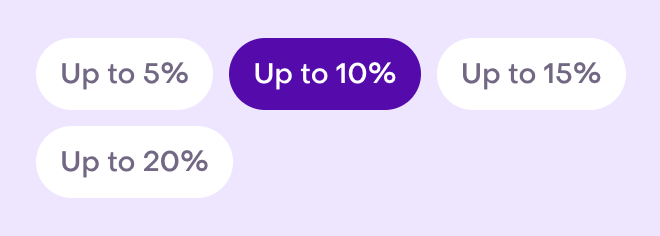
The AI options show Up to 5%, Up to 10%, Up to 15%, and Up to 20%. Choose a limit that respects your margins and stacking rules. Creating and applying an incentive depends on the playbook and store integration.
The figure shows Up to 10% selected in an unsaved Subscriber Booster draft. In that playbook, the generated incentive uses the configured percentage as a fixed rate; do not treat it as a variable AI ceiling for every playbook. The image illustrates the percentage selector and does not show the imported promotions panel. No discount was generated or store promotion changed.
Choose which store promotions the playbook may use
The Store promotions panel lists promotions imported from VTEX. To open it:
- Select Combine store offers with AI incentives or Use existing store offers only.
- Click View store promotions in the selected card. In the combined option, this button sits alongside the percentages, after Up to 20%.
- Review each promotion and its schedule. Turn its switch on to allow it for this playbook, or off to exclude it.
- Use Search promotions to find it by name. The filter icon beside search lets you narrow the list by kind.
- Close the panel with its close button or Escape when you finish.

Selecting a strategy keeps the panel closed until you click View store promotions. On desktop, it opens on the left and moves configuration to the right; on narrower screens, it fills the editor area. Close it to return to the editor.
This example panel contains fictional promotions and a per-playbook selection prepared beforehand.

The filter offers All kinds, Combos, Buy and get a gift, Buy more, pay for fewer, and Discounts. Search and kind work together; Show more extends the results for that selection.

Searching or changing the filter keeps your selections, including promotions you can no longer see. Changing the kind returns to the start of the list and keeps the search text. Filtering a promotion out of view does not exclude it from the agent: turn its switch off to exclude it. Closing and reopening the panel also keeps the search, filter, and selections while you remain in the editor.
How switches and schedules work
Each switch decides whether this playbook may use that imported promotion. Your changes apply to the playbook you are editing; they do not change the promotion in VTEX or other playbooks’ selections.
Without a playbook selection, the promotion follows its default availability in Hellotext. Imported promotions in the Discounts kind are off for the agent by default; turn on the ones you want to allow.
Enabled in the store or Disabled in the store describes the source promotion’s status. This can differ from the playbook switch. An explicit selection replaces the default availability for this playbook, even if the promotion is listed as disabled in the store. It does not activate the promotion in VTEX or guarantee that it will apply at checkout.
The imported schedule still applies:
- A promotion is available to the agent only within its date window and active weekdays, using the business time zone.
- You can configure upcoming or paused promotions in the panel; being listed does not mean they are available now.
- Expired promotions no longer appear in the list.
- Dates and weekdays are displayed in the panel. To change them, edit the promotion in your store and wait for synchronization.
For example, you can allow a promotion that only runs on Fridays. The agent will still respect that day; turning the switch on does not make it available for the rest of the week.
Save or restore your selections
Close the panel, click Go back to return to the cards, and save the playbook with the editor’s final save action. Closing the panel or returning to the cards keeps the draft; complete the save to keep your changes after leaving the editor.
Restore defaults appears when there are playbook selections to clear. It resets every promotion for this playbook, including those hidden by search or the kind filter, and disappears when no playbook selections remain. Save the playbook to keep the reset. Promotions in the Discounts kind return to being off by default.
If you choose the AI-only, coupon, or no-discount strategy, the panel closes and keeps your promotion selections. You can review them again when you choose a strategy that uses store offers.
Before finishing, check that internal promotions are excluded, the public promotions you need are allowed, and their dates and weekdays are correct. Test an offer question and a request for a larger discount to check that the agent follows the selected strategy.
Customize follow-up
Open Follow-up to decide what the agent does when a customer stops replying. This card is available in Smart Recommender, Custom Agent, Instant Answers, Return & Exchange Helper, Order Cancellation Assistant, and Order-Update Delight when your playbook includes the component.
The agent writes each nudge based on the conversation. You configure the count, wait, and final action; you do not need to write fixed messages.
Choose the count and wait
- Under Number of nudges, choose 1 to 10, or None to send no nudges.
- Under Wait for a reply, enter a whole number of at least 1 and choose minutes or hours.
- Under If there’s still no reply, choose the final action.
This fictional example has one nudge, a two-minute wait, and AI Analysis as the final action.

The same wait applies before each nudge and once more before the final action. There is no separate duration for each nudge.
For example, with two nudges available and a ten-minute wait, if the customer does not reply after the agent’s response:
| Time without a reply | What happens |
|---|---|
| 10 minutes | The agent attempts to send the first nudge. |
| 20 minutes | The agent attempts to send the second nudge. |
| 30 minutes | The final action runs. |
None means zero nudges. The agent keeps one wait and then runs the final action; it does not disable follow-up. Channel sending rules still apply, and an attempt that is not delivered can also use up a nudge.
Choose the final action
Under If there’s still no reply, choose what happens after the final wait: AI Analysis, Close the conversation, or Hand off to a person.

With Hand off to a person, click Assignment to review the destination in the same editor. The back arrow or Go back returns you to Follow-up. Also review the destination when choosing AI Analysis, because analysis may decide to hand off the conversation.
The preview shows an example conversation with the waits, nudges, and selected action. Its messages are illustrative; the agent writes real messages based on each conversation.

Replies and later changes
A customer reply stops the pending wait so the agent can answer. After the agent’s response, a new wait starts. Nudges already used still count toward that conversation’s limit; replying does not reset the count. If the limit has already been reached, the next wait leads directly to the final action.
Click Go back to return to the cards and complete the playbook’s final save. Saved changes are used when the agent next answers the customer; they do not change a wait already in progress.
Starting values
The final actions determine what happens after the last wait:
- AI Analysis (default, recommended): Analyzes the conversation and decides whether to close it or hand it off to a person through Assignment.
- Close the conversation: Closes the conversation without sending another nudge.
- Hand off to a person: Transfers the conversation to the team or teammate configured in Assignment.
New playbooks start with these values:
| Playbook | Nudges | Wait before each nudge and the final action | Final action |
|---|---|---|---|
| Smart Recommender | 1 | 2 minutes | AI Analysis |
| Custom Agent | 1 | 2 minutes | AI Analysis |
| Instant Answers | 2 | 10 minutes | AI Analysis |
| Return & Exchange Helper | 1 | 1 hour | AI Analysis |
| Order Cancellation Assistant | 1 | 1 hour | AI Analysis |
| Order-Update Delight | 1 | 10 minutes | Close the conversation |
When using the agent in a route
When the selected playbook includes Follow-up, this component controls the Agent step’s wait, including with None. You can expand the Wait section to review its value, but its controls are disabled. Use Edit Followup in the notice to change the playbook’s settings.
In this example, the step’s six-hour wait is disabled because Follow-up controls it.

If the step has Resolved and Unresolved branches, closing continues through Resolved and a completed handoff continues through Unresolved. AI Analysis decides which action to take. Other Wait steps in the route keep their own settings.
Customize handoff rules
This section applies to AI agents, support playbooks, Webchat, and custom playbooks that show Escalation settings.
Not every playbook needs manual rules. Some support playbooks hand off automatically when they cannot answer, when a rule says to hand off, or when the question needs a person. Some playbooks may also hand off if they detect anger, a defective product, or a request the active playbook cannot solve.
Review:
- Whether the conversation should go to a teammate or a team.
- Which cases should always hand off.
- What context the agent should leave for the team.
- Whether the Inbox team knows this playbook is active.
Atención demo is the fictitious team selected in this Property Collector Escalation draft. It is not a playbook or an assigned conversation. Destination, assignable members, capacity, conversation state, and a human reply are separate stages. The protocol may retain AI collaboration or pause according to the flow; do not assume a universal, permanent pause.

Keep reading: AI handoff to Inbox.
Customize journeys or routes
This section applies to journey or route playbooks.
Routes have visible steps and are sensitive to sequence changes. When editing a route, change one part at a time:
- The trigger or starting signal.
- The first message.
- A wait step.
- A condition or branch.
- An assignment step.
- An exit or stop condition.
- A coupon, link, or product recommendation.
The figure identifies the Assignment component in a fictitious new route form, without saving. Its five complete actions are step controls; they do not represent a constructed route or a processed conversation. Review their order and targets: closing, assigning, and changing AI attention are different actions. A step edit does not establish that existing work was canceled.

If a route has no more steps to run, the flow ends. If you add conditions or branches, test both the expected path and the path that should not run.
Test based on playbook type
Use the Playground or preview whenever it is available.
Check which configuration the test uses: a draft or the saved version. The Playground can run AI and save a simulation conversation; it is not just a static image. A reply there does not confirm identity, consent, channel, eligibility, assignment, or delivery in a real conversation. The figures in this guide did not run tests. To validate a real flow, use only authorized test data and recipients and review each stage separately.
For an AI agent, test realistic language with typos, short replies, objections, and unclear intent.
For a custom agent, test messages that should activate that agent and messages that should go to another playbook.
For an active sales playbook, test that recommendations, discounts, links, and eligibility conditions still make sense.
For a route, test one customer profile that should enter, another that should not enter, and at least one alternate branch.
For a support playbook, test a question it can answer, one it should hand off, and one that should stay out of scope.
Review after the change
After the change is live, review early results before making another adjustment.
Look for:
- Unexpected handoffs.
- Repeated unanswered questions.
- Out-of-scope replies.
- Discount use that is too aggressive or too weak.
- Customers entering the wrong playbook.
- Changes in conversion, revenue, replies, opt-outs, or handoff rate.
Compare the same playbook type, population, and period, with the report’s units and rules. A change after an edit does not by itself prove that the edit caused it; some signals and attribution arrive later.
If results move in the wrong direction, revert the smallest change first. Check the saved state and pending work again: restoring configuration does not undo sent messages, provider actions, or already saved data.
Related guides
- How to enable a playbook
- How Hellotext decides whether a playbook can send
- Troubleshoot a playbook that did not trigger or send
- How to write a great agent prompt
- Property Collector playbook
- Webchat Widget playbook
- Instant Answers playbook
- Review Builder playbook
- CSAT Pulse playbook
- NPS Pulse playbook
- Return & Exchange Helper playbook
- Order Cancellation Assistant playbook
- Custom Agent playbook
- AI handoff to Inbox
- What are signals?
- Getting started with journeys
- Troubleshoot missing signals or activity
- Playbook reporting