
Use this guide when you want to invite visitors and customers to subscribe from a conversation, with clear consent and an optional incentive.
Subscriber Booster presents an invitation with options to accept or decline. It can use an offer for a first or next purchase, depending on the customer’s purchase history.
The invitation uses predefined text variants in the business’s language. After acceptance, Property Collector’s AI can request the configured data that is still missing. You choose the incentive percentage in the configuration.

What Subscriber Booster does
The playbook can:
- Present a subscription invitation in Webchat and supported incoming conversations.
- Show a teaser next to the Webchat launcher.
- Offer the configured incentive or present an invitation without a discount.
- Record subscription when the customer explicitly accepts.
- Collect missing profile properties through Property Collector.
- Request phone or email confirmation when the original channel does not prove ownership of that destination.
A subscribed profile still needs a valid destination and permission for the channel you will use. Review consent and subscriber status before including it in a campaign.
How the invitation starts
At the beginning of Webchat
When an eligible visitor opens Webchat, Subscriber Booster can present the opening invitation. The teaser can introduce the incentive before the chat opens; opening it reveals the acceptance options.
Webchat Widget must be enabled and installed, and Subscriber Booster must be enabled. Review Webchat Widget playbook to prepare the website.
Choosing not to show the teaser keeps the normal way to open the chat. That setting does not, by itself, disable Subscriber Booster’s invitation inside the chat.
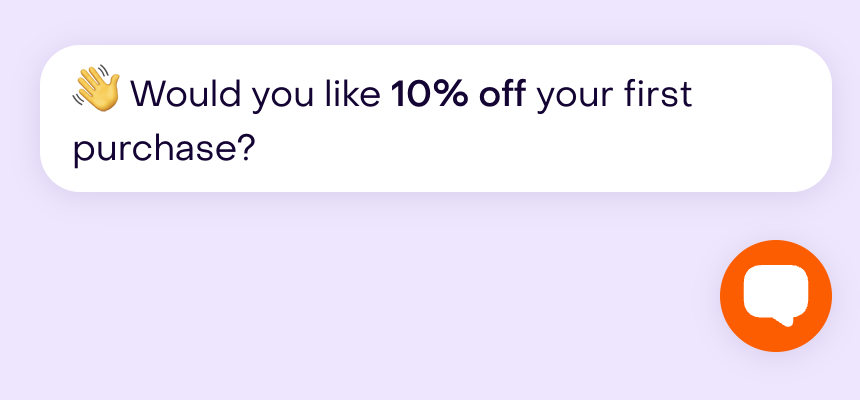
When a WhatsApp conversation starts or reopens
On supported incoming channels, the invitation can start with the customer’s first message or when they reopen a conversation that was closed. It applies to profiles that are not subscribed yet and to the channels allowed in the configuration.
On WhatsApp, check that this entry moment fits the service experience you want to offer. The playbook does not automatically wait for a support request to be resolved before inviting the customer. The invitation begins from a conversation the person initiated.
How it works with Property Collector
Subscriber Booster has its own Properties to collect list. Select useful subscription data and avoid requesting information you do not need.
For the collection conversation to work, the standalone Property Collector playbook must also be enabled. Its agent performs the temporary collection using Subscriber Booster’s list.

Phone is part of this playbook’s required data. You can adjust the other available properties, such as email and name. The playbook requests configured values that are missing from the profile.
For selection options and answer handling, see Property Collector playbook.
Consent and incentive delivery
The invitation should explain that the customer accepts promotional messages and can unsubscribe. Explicit acceptance records subscription; data collection or identity confirmation may continue afterward.
When acceptance comes from Webchat, Instagram or Messenger, the captured destination may need confirmation. If the business has an active WhatsApp channel, the customer continues there; otherwise, email confirmation may be needed. A saved phone or email does not, by itself, prove that the person controls that destination.
For a percentage incentive, Subscriber Booster uses the rate you configured. Generating the code requires a compatible commerce integration. If you select a Hellotext coupon, review its validity and usage conditions.
Check incentive delivery and review the coupon’s redemption conditions. Retrying an acceptance does not define how many times the coupon can be redeemed.
When to use it
Use Subscriber Booster when:
- You want to offer subscription when someone enters Webchat or starts an eligible conversation.
- A first- or next-purchase incentive helps explain the benefit of subscribing.
- You need to collect a few profile details alongside acceptance.
- You can complete destination confirmation and deliver the incentive you offer.
Use a Website Popup or Website Form for a visual form-based experience.
Use a QR Code Subscriber or Shareable Link when the person should initiate opt-in from a scan or link.
What it needs before launch
Before enabling the playbook, confirm:
- Webchat Widget is enabled and installed if you will use the website invitation.
- The selected incoming channels are connected and can receive customer replies.
- Property Collector is enabled and the selected data is necessary and clearly named.
- The invitation and consent match the experience you want to offer.
- The configured incentive can be generated or delivered, with valid conditions.
- WhatsApp or email confirmation can be completed when required.
What you can configure
Open Playbooks, click Explore playbooks, find the Capture group, and choose Subscriber Booster.
Review these components:
- Incoming channels: choose where the invitation can appear. Manual selection lets you limit it to the channels you prepared.
- Discounts: select the strategy and percentage, an available coupon, or an invitation without a discount.
- Properties to collect: configure the missing data to request after acceptance, once Property Collector is enabled.
- Webchat options: choose whether to show the teaser next to the launcher.
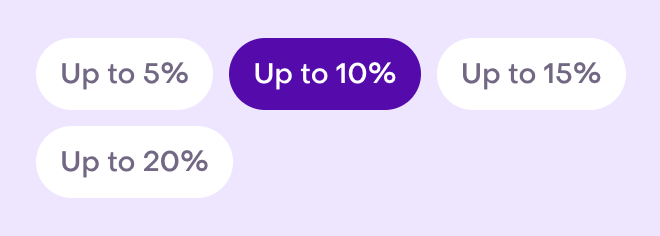
The Combine store offers with AI incentives and Create new AI-driven offers only strategies let you choose a percentage. For this playbook, that percentage is the configured offer; AI does not change it based on the conversation. Store-only and no-discount options do not generate this percentage incentive.
In Webchat options, choose Show teaser message to new visitors or Do not show teaser; chat opens only on click or trigger. The preview lets you review the invitation next to the launcher.

How to test it
Review the preview and components first. Confirm the percentage, consent text, channels and properties before enabling the playbook.
In a controlled Webchat test:
- Open the website with a test profile representing a new visitor.
- Check the teaser and invitation inside the chat.
- Verify that acceptance is explicit.
- Review missing-data collection and destination confirmation, if requested.
- Check the incentive received and its conditions.
On WhatsApp, test both a first conversation and the reopening of a closed conversation. Verify the entry moment and that the team can continue handling the customer’s original need.
The preview shows the invitation message. A full-flow test should also check the saved data and final delivery.
What to review after launch
Review the conversations and profiles that participated. Check whether people understand the invitation, clearly accept, and complete any required data or confirmation.
Also check that the incentive matches the configuration and can be used under its conditions. Adjust the channels, percentage or properties when those conversations give you a concrete reason.