
Use this guide after your first campaign, playbook, route, capture, or Inbox workflow has been live for a few days.
Confirm that setup is working, customers are behaving as expected, and you know what to tune before expanding.
For the first week, focus on signal quality and operational health as much as revenue. Define a concrete goal and record launch date, audience, channel, business timezone, and reporting period. Keep those references for each review; seven days from launch can differ from the last seven calendar days.
What to review first
Start with the basics:
- Did the right customer profiles enter the audience or workflow?
- Did Hellotext receive the expected signals?
- Did messages send through the expected channel?
- Did links, replies, handoffs, and reporting work?
- Did customers react in a healthy way?
- Did any orders, clicks, or revenue appear in the expected reports?
If setup or tracking is wrong, fix that before comparing performance. A received signal, an existing order object, and a delivered message are different states. Check the profile, reference, source, and timestamp of an existing record before concluding that a sale is missing or an automation worked.
Day 1: confirm launch health
On the first day, look for obvious issues.
Check:
- Sent, delivered, failed, and skipped messages.
- Unexpected opt-outs, complaints, or negative replies.
- Broken links, wrong offers, incorrect products, or bad personalization.
- Replies that should have reached the Inbox.
- Playbooks, routes, or agents that should have paused or handed off.
- Events, clicks, orders, and attribution appearing where expected.
In Campaigns → Delivered, open the campaign and check the report selector. Choose First 7 days to evaluate the first week; use Custom for the first day or an exact interval and check the timezone. The demonstration below retains First 14 days, the default; its amounts and rates illustrate the controls, not your first-week results.

The cards are Attributed revenue, Average ROI, Conversion, and Revenue/message. This fictional 14-day example shows USD 1.9K (USD 1,872 before abbreviation), 5.4×, 6.3%, and USD 0.36. ROI divides attributed revenue by estimated delivery cost; conversion divides attributed purchases by delivered messages. Check source records and denominators as well as the percentage.
Distinguish an accepted request or prepared message from a dispatched send and a confirmed delivery. Check individual message states and reasons where available; messages skipped before a record is created do not necessarily appear as delivery failures. An API received notice does not confirm delivery or attribution either.
Pause and fix the workflow if the wrong audience is receiving messages or if customers are seeing incorrect content. Check what each workflow can stop and which messages remain pending: pausing does not recall messages already handed to the provider. Preserve opt-outs and do not reactivate contacts to repeat the test.
Days 2 to 3: read behavior, not just totals
After the first launch window, look for patterns. Compare equivalent dates, channels, and populations, and retain the sample size. Inspect negative replies and complaints in available conversations or records; do not assume that every question in this list has an automatic report column.
For captures, review:
- Which source is creating subscribers.
- Whether the opt-in path is clear.
- Whether the captured customer profile data is useful.
For campaigns, review:
- Recipients, delivery, clicks, replies, conversions, and attributed revenue.
- Which link, offer, product, or segment created the strongest response.
- Whether opt-outs or complaints suggest the audience or message was too broad.
For playbooks and routes, review:
- Which trigger or signal started the workflow.
- How many customer profiles were eligible.
- Where customers stopped, replied, converted, or handed off.
- Whether timing, branch conditions, or message copy need adjustment.
For Inbox, review:
- Which questions customers asked.
- Which conversations needed human help.
- Whether assignments and response times were clear.
- Whether AI or playbook handoffs gave the team enough context.
Distinguish CTR from Engaged: campaign message rows divide tracked clicks in the period by deliveries, while Channel performance uses messages with at least one click divided by deliveries. The campaign funnel’s Engaged stage includes delivered messages seen, clicked, or replied to, once per message, and groups those outcomes by dispatch day. A later reply can update an earlier day. Do not compare these figures as unique people who clicked or as the same population as purchases in the period.
For captures, a created or reachable profile does not establish marketing permission. Check consent for the channel, destination, and message type alongside subscription state and source. For playbooks and routes, inspect the specific trigger and step; a large audience does not mean everyone entered or received every message.
Day 7: decide what to do next
After the first week, choose one of four actions.
| If you see… | Next action |
|---|---|
| Healthy delivery, useful replies, clean reporting, and early conversions | Keep running and expand carefully. |
| Healthy setup but weak clicks, replies, or conversions | Tune audience, offer, copy, timing, or playbook logic. |
| Bad data, missing signals, broken links, or unclear attribution | Fix setup before judging performance. |
| Unexpected opt-outs, negative replies, wrong audience, or support overload | Pause, reduce scope, and relaunch smaller. |
Record the decision, supporting evidence, and a date to review again. Change one main cause at a time so you can explain the result. A better rate from few cases is not enough to expand: retain consent, channel limits, and team capacity.
Metrics that matter early
The most useful early metrics depend on what you launched.
For audience growth:
- New subscribers.
- Opt-in source.
- Consent quality.
- Profile fields collected.
For campaigns:
- Delivery and failure rate.
- Clicks and click-through rate.
- Replies.
- Conversions.
- Attributed revenue.
- Opt-outs or complaints.
For playbooks and routes:
- Trigger volume.
- Eligible customer profiles.
- Sends, skips, waits, and stop conditions.
- Replies, handoffs, and conversions.
- Orders or attributed revenue when applicable.
For Inbox and support:
- New conversations.
- Assigned and unassigned conversations.
- Response time.
- Repeated questions.
- Handoff quality.
Open the Workload & capacity report to distinguish volume from capacity. The fictional view below uses Custom, September 11–24, 2026, with Active load selected; it is not a first-week launch cohort.
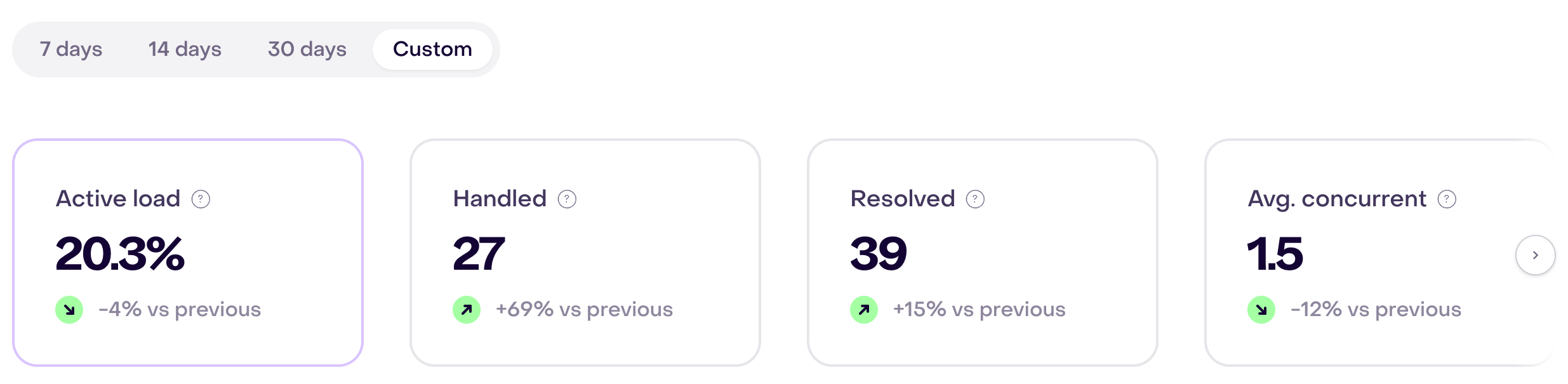
The example shows Active load 20.3%, Handled 27, Resolved 39, and Avg. concurrent 1.5. Active load compares handling time with available capacity; Handled counts distinct conversations with human handling overlapping the period, and Resolved uses human resolution date. Do not subtract these cards to calculate pending work. Inspect the current queue: in Operational Pressure, Unanswered, Oldest waiting, and SLA risk show current state, while Utilization and Concurrent use the selected period. Response times belong to their service measurement, not the concurrency card.
What not to overinterpret
Avoid making big conclusions from:
- A very small audience.
- A launch that only ran for a few hours.
- A broken link or missing event that affected the test.
- One unusually large or small order.
- Attribution before the full window has had time to run.
- A campaign and playbook competing for the same customer profile.
In the campaign report, Time to conversion groups attributed purchases made during the selected period by time since campaign launch. It does not measure each person’s delay from their click or extend the attribution window.

The fictional distribution shows 9% / 47% / 19% / 25% / 0% for same day, 1–3, 4–7, 8–30, and 30+ days. An 8–30-day bar does not mean every campaign must wait 30 days or that every later purchase is eligible. Check its date and attribution evidence. A reporting period can include later purchases without the original deliveries; conversion can show zero when its delivery denominator is zero.
If two views differ, follow Data completeness and reporting gaps and reconcile one or two existing records. Avoid creating orders, events, or sends to make a total match.
Early data should help you find what to check next. It is not always a final verdict.
Questions to answer before expanding
Before you turn on more playbooks, routes, campaigns, or agents, answer:
- Are customer profiles, consent, and channel eligibility clean?
- Are the right signals reaching Hellotext?
- Are customers receiving the right message at the right time?
- Are replies and handoffs reaching the right people?
- Can you explain the results you are seeing?
- Do you know what to tune next?
If the answer is no, keep the launch small while you fix the weakest part.