
Use this section when something in Hellotext does not look right and you need to narrow down where to check first.
Record what you expected, what you observed, the business, record or URL, and date and time with time zone. Locate the last confirmed stage: data received, action started, message created, delivery, assignment or response. This guide’s figures are independent fictional examples; they do not represent an incident or its recovery.
Troubleshooting usually starts in one of these places:
- Setup and integrations.
- Channels and message delivery.
- Tracking, reporting, and attribution.
- Inbox operations and team workflows.
- Captures and website experiences.
- Page access and loading.
If you are not sure where the issue belongs, start with the troubleshooting checklist.
Setup and integrations
If customer profiles, products, orders, or channel settings are missing or stale, start by checking the integration and setup path.
First confirm the selected business and record identity or reference, together with its source. An existing product or order does not establish that its event was recorded; a profile with an email or phone does not establish verification or permission to contact it.
In Settings > General, this fictional example shows the name Enterprise and public ID 4ONLdN32. The name does not establish the contracted plan, a connection or a business switch; the figure helps locate the context to record.

Keep reading: Setup and integrations overview.
Message sending and deliverability
If a message is not delivered, first check the channel used, sender configuration, consent, available balance or plan access, and any temporary sending limits.
Distinguish omission before message creation from an existing message that is pending, dispatched, routed, delivered or in error. Preserve the exact state and warning. Channel availability, permission for that destination and communication type, and delivery are separate checks. Available balance does not necessarily remove daily or monthly limits; fallback through another channel depends on the workflow and its eligibility.
Start here: Why a message did not send.
For SMS-specific limits on new prepaid businesses, keep reading: SMS sending limits for new businesses.
If the issue is a WhatsApp template under review, rejected, flagged, or paused, use Troubleshoot WhatsApp templates.
For channel setup context, keep reading: Messaging channels overview.
If a Push notification does not arrive, appears twice, or is missing an image or buttons, follow Troubleshoot Push notifications.
For Push, compare the site origin, browser permission, local subscription and server registration separately. The origin field helps identify protocol, domain and port; a page path is not the origin.
The figure shows https://shop.example.test in the real form as an unsaved fictional example. Continue was not pressed: it does not show a created channel, permission, subscription, worker installation or delivered notification.

Campaigns
If a campaign result looks lower than expected, review the selected audience, channel, message content, links, timing, and report metrics before comparing results.
Compare the same period, time zone, population and unit. The selected audience can contain overlapping lists or segments and exclusions; its size is not the number of messages created or delivered. Report rates have their own denominators and later signals can update the delivered-message cohort by dispatch day.
This independent historical fictional report retains First 14 days, April 19–May 2, 2026, anchored to the campaign. Desktop shows four complete cards: attributed revenue USD 1.9K, ROI 5.4 as a multiple, conversion 6.3% and revenue per message USD 0.36. The narrow view shows the first carousel card. These are not the current last fourteen days or the outcome of resolving an issue.

Keep reading: Campaign reporting.
Tracking and attribution
If conversions, events, or attributed revenue do not match expectations, check whether tracking is installed, events are being sent, links are tracked, and attribution rules apply.
Separate an action definition from each recorded occurrence. Compare the tracking name, identity or session, reference, source and event time. Loading the SDK does not confirm initialization: initialization is asynchronous and each real view needs to record page.viewed explicitly. An HTTP 200 acknowledgment with received does not establish processing, attribution or delivery.
In Settings > Actions > Custom, the catalog shows the fictional appointment.booked / Appointment booked definition with zero events. Full and narrow views help identify the definition; they do not show an appointment occurring or a signal received. Attribution also requires checking the chronology and rules of the sources involved.

Keep reading: Analytics, reporting, and attribution overview.
If a signal, event, profile update, segment, playbook trigger, or report metric is missing, start with Troubleshoot missing signals or activity.
If the issue is specific to one playbook, use Troubleshoot a playbook that did not trigger or send.
Inbox and team workflows
If conversations are not being handled by the right person, or response performance looks off, check assignment, roles, ownership, and response-time configuration.
Distinguish receipt, conversation owner, team destination, availability or capacity and an actual response. Waiting for capacity differs from having no assignable people. Role, team membership and capacity are separate settings; access depends on the tool and plan.
This independent figure shows the existing selector for Lucía Méndez, a fictional teammate with Agent selected, unchanged. The heading and all three options are complete; the entire save footer is omitted. It is not your role, an invitation or an assignment result. Next saves the role and was not pressed.

Response targets use the business calendar and time zone. A human response and a provider acknowledgment are different; closing or snoozing also does not establish a response. Preserve conversation evidence and current settings before attributing a wait to a role.
Keep reading: Inbox and conversations overview.
Captures and website experiences
If a popup, form, Webchat, QR code, link, or checkout opt-in does not appear or register the customer, first identify whether the problem is availability, installation, interaction, verification, the customer profile, or a later action.
The Capture catalog helps choose the tool to inspect. Saving a draft, publishing it, making it visible or enabled, installing it and receiving an interaction are different stages. Checkout opt-in depends on the commerce integration and is not a tool in this catalog.
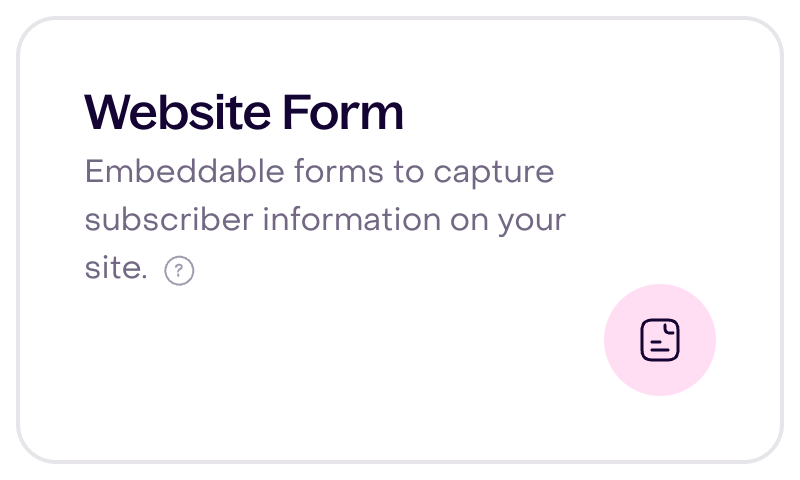
The figure reuses an independent fictional desktop Popup and Form example. The narrow view focuses on Form in the same desktop catalog, rather than showing a new mobile interface. Seeing the card does not establish publication, installation, submission, verification or consent; receiving a profile also does not confirm the subsequent action.
Start here: Troubleshoot a capture that does not appear or register customers.
Page access and loading
If a page is blank, does not finish loading, or shows the same error, preserve the URL and time of the problem before reloading.
Add the business, exact warning and last confirmed step. If this happened after saving, importing or sending, reconcile the original outcome before repeating: a missing visible response does not establish that the operation failed. A loaded document also does not confirm that all panels or resources have finished. Review screenshots and logs to exclude passwords, tokens and codes before sharing them with Support.
Start here: Troubleshoot pages that do not load.
If the problem continues, review Contact Hellotext Support.